Showing posts with label AF. Show all posts

Friday, October 9, 2009

7D vs G9 at ISO 1600

.
I’m laughing at myself for misconceptions and memories of the quality of my G9.

Since getting the 7D, I’ve been randomly playing with it and marveling at its capabilities. Although I have other lenses, all my shots so far have been with the (cheap) 50mm fixed lens. I thought this was supposed to be a good lens and would give me a large aperture 80mm equivalent for portrait work. One of my first shots was this one (taken out the door, down the hall and cropped to hide the junk on my desk) at f2.8 and ISO 1600.


I didn’t do anything special to get this picture – just set ISO 1600, f2.8 and fired off a Av mode in-camera JPEG. The small rectangle AF focus point was placed on the center of the bookshelf. This is a 100% crop so we are pixel peeking here. All done rather simply and quickly. No matter how I rationalized, this is not a good result. In fact, my G9 would do better.


Or would it? The G9 was handy so I set it for ISO 1600, zoomed in a bit to get roughly the 50mm equilvalent focal length and fired off another shot. The G9 shot was also at f2.8. Here’s a similar 100% crop.


Hmm, perhaps that 7D does take a better ISO 1600 shot after all!


I’ve been tweaking the focus adjustment for that 50mm lens but have concluded that it is just very soft at f2.8. Fortunately, it improves rapidly as the aperture is stopped down. This is a little frustrating to me but, after all, it is a cheap lens.

The 7D was easy to set up and use for basic photography but I have a lot to learn about it.


.

Monday, August 11, 2008

G9: Focus Conclusions

.
It’s time to force myself to document my conclusions about focusing the G9. When the G10 is announced, I’ll get caught up in all the hoopla. So here’s what I’ve learned and concluded as well as my current focusing practices for the G9.

First a summary of the G9 focus posts:
Introduction to G9 focusing
Focusing outdoors
Focusing indoors
Face detection
G9 use of hyperfocal focus
G9 hyperfocal chart
Problems focusing on low contrast subjects
Beeps when focused

After all this, I still prefer to use the small Flexizone frame, recompose and shoot when I have the time to do so. Yes, I know this can be slow and methodical, but that’s me as well. For repetitive shots, I often get small Flexizone frame focus, switch to manual and continue shooting. I focus this way for macros when the G9 is tripod mounted.

For landscape shots, I often use manual focus set to infinity. It's easy and certain but be sure to switch back to auto focus!

When wild and crazy and partying, it’s just better to set the G9 on face detection focusing – especially if the camera is passed around a bit. Usually, but not always, face detection works well.

OK, the focusing post is done, where’s the G10?
.

Friday, June 6, 2008

G9: Can’t Focus


.
Sometimes the G9 can’t focus. When the G9 has acquired focus, it beeps twice (very quickly) and the AF frame on the LCD turns green. If the G9 is confused about the focus, it only beeps once and the AF frame turns yellow. That (yellow frame) was the case for this uncropped image. For this composition – as attractive as it is – the small AF frame did not include any details and the G9 could not focus. I pressed the shutter button anyway and got an out-of-focus picture.

Switching to manual focus immediately after the shot, I found that the G9 decided to focus at infinity instead of the true distance of about nine feet. Had I selected the nine large frame AiAF focus method, the G9 would have focused correctly because some of the frames would have included the plaques (tested and proven).

As noted previously, I almost always use the small Flexizone frame for focusing. I even leave the frame centered; that is, I focus, recompose and shoot. But sometimes, especially when in a hurry, this is not the best method and it definitely is not the best method without recomposing.

The G9 focuses by means of contrast detection and tends to select the closest object. When using the small AF frame to focus, make certain that the focus frame includes an edge, some sort of pattern, different colors, different lighting, etc. In fact, when using the large frame or the multiple AiAF frames, keep in mind that the focus point will be selected on the basis of proximity and contrast.

And watch for that frame to turn green!

.

Sunday, May 25, 2008

G9 Hyperfocal Chart

.
Continuing the series on focusing the G9, knowledge of the hyperfocal distance is extremely useful when focusing any camera. Previous postings have included observations about the G9’s use of hyperfocal focusing and depth of field for closeups.

Somewhat loosely speaking, but easy to remember, is that if a camera is set for the hyperfocal distance then everything from that distance to infinity is acceptably in focus. In fact, everything from half that distance to infinity is in focus. For more details, check Wikipedia .

A most useful reference for both hyperfocal distance and depth of field is DOFMaster . Since both hyperfocal distance and depth of field vary with digital sensor size and focal length, here’s a chart of hyperfocal focusing distance specifically for the Canon G9 that was made by using the DOFMaster online calculations.


In addition to the hyperfocal distance, the table includes the near/far distance that is in focus when the G9 is focused at 10 feet. Why 10 feet? When the G9 is first turned on and switched to manual focus, it is set for (roughly) 10 feet.

Here’s an example of how the chart can be used. With your G9 turned off, set the Av mode at f5.6. Now turn the G9 on. The default focal length is the wide angle (7.4mm focal length) when the G9 comes on in Av mode. Immediately, switch to manual focus. You’ll see that the default focus distance is about 10 feet. Referring to the chart above for the 7.4mm lens, the hyperfocal length at an aperture of f5.6 is 5.3 feet. This means that, if the focus distance had been set for 5.3 feet then every distance from 2.65 feet (=5.3/2) to infinity would have been in focus. However, the default distance is 10 feet so everything from 3.5 feet (near focus) to infinity is in focus.

The G9 almost does not require focusing at the wide angle setting! But this happy situation changes dramatically at the longer focal lengths as shown in the chart.

Since aperture, focal length and manual focus distance can be saved as a custom setting (page 109 in the manual), the G9 can be preset for special situations -- including hyperfocal focusing.
.

Friday, May 23, 2008

G9: Focus on Focusing

.
The G9 is an extremely versatile camera. Among its many options are (at least) five different choices for automatic focusing methods plus manual focus. I’ve always used the same method in the past but it is past time to learn the others so the next several posting will be about focusing the G9.

The G9 automatic focus methods are:

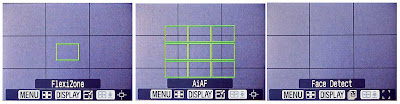
Flexizone – a single rectangular frame normally in the center of the display but which can be moved as desired. The frame can be large or small. The G9 focusing logic sets the focus distance so that the object in this frame is in focus.

AiAF – A 3x3 matrix of rectangular frames in the center of the display. These frames can be large or small. Only the small frame matrix can be moved off center. The G9 focusing logic somehow selects one or more of these frames and sets the focus distance accordingly. (“AiAF” apparently means “Artificial Intelligence Auto Focus” but I can’t find that definition in the manual.)

Face Detection – Magically, the G9 detects faces (or objects resembling faces) and sets the focus accordingly.

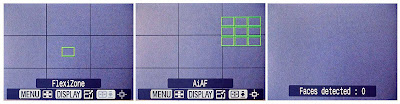
The autofocus mode is a menu setting (page 116 of the manual) as shown above but can also be set with a few button presses on the back of the G9 as shown here. First, with the G9 in shooting mode, press the AF frame button (numbered 19 on page 42 of the manual) shown circled here. The display will change as shown (but with the current AF frame selection). The AF frame selection is then toggled between Flexizone, AiAF and Face Detection by pressing the Menu button, examples are shown below.


For Flexizone and AiAF, the size of the frame can be changed by pressing the Display button, the smaller frames are shown below. Both Flexizone and the small AiAF frames can be moved with the Control Dial.


When in Face Detection mode, pressing the Display button indicates how many faces are detected.

When using the G9, I always recommend pressing the shutter button halfway to achieve focus. Once focus is achieved, the G9 gives two quick beeps and the focus frame turns green.

My normal practice is to use the small Flexizone frame in the center position to obtain focus on the subject of interest. I press the shutter button halfway to achieve focus, hold the button at the halfway position, recompose and shoot. To get a second or similar shot, I might switch to manual focus because the manual focus position is retained until the next autofocus.
.

Monday, March 24, 2008

Was it really focused?

.
When the G9 has acquired focus, it actually beeps twice (very quickly) and the AF frame on the LCD is green. If the G9 is confused about the focus, it beeps only once and the AF frame on the LCD is yellow. Granted, the beeps are difficult to distinguish and sometimes the yellow vs green is not so obvious either but this is the way the G9 tells you that it thinks it is focused.
.