Friday, December 28, 2007

G9: The Sweet Aperture

.
Many devices have a “sweet spot”; that is, a place, operational mode or setting where the device works best. Sports provide some of the best examples: baseball bats, tennis racquets and golf clubs all have a sweet spot (even if I could rarely find it!). Machines are the same way. Long ago I learned that a automobile engine runs best under conditions corresponding to a highway speed of something like 45 miles per hour. Wonder if that is still true? Centrifugal pumps certainly have a sweet spot; it’s even called the Best Efficiency Point (BEP). Generally speaking, when additional information is not available, I assume that the sweet spot of any device is near the middle of its operating range. The end points of an operating range are typically compromises in some way or other.

The G9 aperture can be varied between f2.8 and f8. The sweet spot in this range is somewhere between f4 and f5. After a few tests, I’d say that the sweet aperture of my own G9 is about f4.5.

A simple test was set up as shown here with a ruler on a table in window light. The G9 was on a tripod, in Manual exposure mode, shooting raw + jpg at ISO 80 and set for the 2 second shutter delay to avoid camera shake. The coins were placed along the ruler for reference points. After determining the correct exposure, pictures were taken at various apertures (changing shutter speed to keep correct exposure). The focus was obtained automatically at the penny but I was concerned about the effects of focus so all tests were repeated using focus bracketing; however, this turned out to be unnecessary.

Here is a composite of the crops from the in-camera jpgs. Several things are going on here and all at the same time. The exposures vary a little bit and the outdoor window light also varied somewhat. As expected, depth of field increased as the aperture decreased (f-number increased). Some sort of in-camera sharpening, contrast, etc is being done as well. All these images look reasonable and about the same at first glance. Now click on the image to get the 100% crop view. Take a close look at the scale markings of the f4.5 variation at the penny. The scale graduations are in 1/64 inch and every graduation is visible. Two inches closer to the camera, near the nickel, the f5 version shows more detail and the f4 version shows the least detail. This is the effect of depth of field. The same effect should be seen near the dime at the 8 inch mark – the most detail in the f5 shot. But wait! The f5 shot is worse than the f4.5 shot. Notice that details of the graduations are visible out to about 7-32/64 on the f4.5 shot but only about 16/64 on the f4 and f5 shot. What is going on here?

Remember, I was shooting raw + jpg but taking the easy way out and using the in-camera jpg to draw conclusions. Time to examine the raw files. The raw files led to exactly the same conclusion: f4.5 is the sweet aperture for the G9. The raw files also revealed much more detail than the in-camera jpgs. In this composite (click for an enlargement), the f4.5 crop from raw (middle) reveals detail out to about the 8-8/64 inch mark. But notice that the f8 crop from raw (right) shows even less detail than the f4.5 crop from the in-camera jpg. In fact, the f8 crop from raw is noticably soft along the entire length. These are unexpected results except for the concept of the “sweet spot”.

What is the technical explanation for this sweet spot near f4.5 for the G9? The answer to this question appears to be related to the diffraction limit. I’m certainly no expert in diffraction but here are some handy links for a more detailed explanation and even some calculations.

Wikipedia has a detailed explanation of diffraction.

There is a good explanation of diffraction in digital photography and even a calculator to estimate the limiting aperture at http://www.cambridgeincolour.com/tutorials/digital-camera-sensor-size.htm.

In a final comparison, instead of the 100% pixel peeping monitor view, I made 8x10 sized, full frame matte prints on a Canon i9100 printer. Near the 8 inch mark, the 1/64 graduations are not detectable with the unaided eye from any of the variations! Even so, the f4.5 print from raw is obviously preferable to the others.

When the absolute maximum quality image is required, I’ll be tending to shoot my G9 at f4.5 but the larger and smaller apertures are still very useable – and I do drive faster (and slower) than 45 mph!

Note: Knowing I would be writing that raw revealed more details than jpg, and anticipating the grief that would come my way for doing so, I suddenly remembered that when the G9 is set for raw + jpg, the in-camera jpg is compressed at the “Fine” level whereas in pure jpg mode the “Super Fine” compression is available. I repeated the test shots in jpg only, using “Super Fine” compression mode. The results are the same: f4.5 is the sweet spot and raw reveals more detail than jpg; however, Super Fine compression does reveal slightly more detail than Fine compression. I believe that the difference in the raw and jpg shots is not “raw vs jpg” but is instead an indication of the in-camera noise reduction that is done on the in-camera jpg even at ISO 80. The raw file did not have any noise reduction applied. Should noise reduction have been applied to the raw files? Well, you were looking at 100% crops, would you apply noise reduction?

Sunday, December 23, 2007

Friday, December 21, 2007

G9 on SmugMug

I've set up a special album on SmugMug for my better G9 photos.

Doesn't it seem strange to group your work by the tool that was used? Even so, a G9 album is probably useful for the time being.

A word about selecting and showing your best photos: Once I attended a photo workshop in which the instructor was asking everyone "Why are you here?" My response was that I wanted to increase my "yield" of good photos. The instructor asked how many good photos I got per roll (right, this was in the days of film). I was embarrassed to say that I got about 3 good shots per roll of 36 exposures. The instructor then said, "I wish I could get three good shots per roll!" Later, during his slide show, I realized that I was not getting any good shots per roll!

So don't take my G9 album as an indication of what the G9 can do -- it's what *I* can do at this time. I hope your shots are better and that my own get better.

Wednesday, December 19, 2007

Of Hammers and Cameras


My dad had many hammers. Hammers large and small, short and long, wood, metal, fiberglass and plastic were scattered around his workshop: claw hammers, framing hammers, tack hammers, ball-peen hammers, a sledge hammer, various mallets, mauls, and hatchets. There was even an electric hammer, a nail gun that automatically focused just the right amount of energy on a special nail to drive it precisely into the wood. My dad did not collect hammers but he had many because he loved to make things, especially of wood.

It never occurred to me to ask my dad which hammer was his favorite. His hammers were tools; each had its own purpose and function. All the same, I knew that one hammer was special even though it was not the most specialized and certainly not the most expensive.

As a young boy learning to use a hammer, my dad would give me a handful of nails and a board. While he was doing his woodwork, I’d sit on the workshop floor and tap away, holding the hammer midway up the handle. Tap, tap, tap, taking dead aim with each tap. Hit the nail on the head. Tap, tap, tap. Time for a story and a lesson.

In the Depression, my dad was working at F. W. Woolworth’s – one of the original “five and dime” stores – when he got a better job at a shipyard. He had to provide his own hammer for the new job so he bought a claw hammer at Woolworth’s for fifty cents. That fifty cents represented a substantial part of his wages but also an investment in his future. On one of his first days at the shipyard, as he was using his new hammer, an older worker asked to see it. My dad proudly handed over his new hammer only to see his co-worker immediately saw off the bottom half of the handle. When my dad asked, “Why’d you do that?” his co-worker replied, “Well, you weren’t using the bottom part of the handle anyway!” Daddy was then told to take it to the repair shop and get a new handle – which he did. A lesson taught, learned, and taught again.

There are newer and perhaps better hammers than that five and dime Depression hammer. Computer designed and made of space age materials, a modern hammer is a model of efficiency as a striking tool. Some don’t even look like hammers. Modern hammers are variously engraved, marked and labeled promoting these features (not to even mention the safety warnings!). My dad’s old hammer is marked only “Drop Forged” but I feel certain it was “Made in the USA”.

As child, my goal was to learn to use that hammer correctly. I practiced. I drove nails, pulled them out, straightened them and drove them in again. I wasn’t making anything – just practicing using that hammer. Practice makes perfect.

No one ever asked my dad which hammer he used to build his workshop, make a roll top desk, frame a picture or fashion a cradle for his great-grandchildren. Of course, his answer would have been different in each case and would have always included “The right tool for the job”. So I learned that even though a tool might be selected on its own merits for a job, the favored becomes the favorite through years of generating a life’s work and the tales that embellish it.

My dad had more saws than hammers, but that’s another story.

I had eight hammers myself. Now I have nine but these days am more likely to be seen with a camera in my hand. Photography is my wood and I have, well, quite a few cameras to practice with. You never can tell when one might be needed and I certainly want to use the right tool for the job.


Sunday, December 16, 2007

G9 Display in Flash Mode

There are many ways to do flash photography with the Canon G9. I've given some examples here, here and here and will be giving more. As always, I recommend that you do as I do and follow Strobist for learning off-camera flash. Meanwhile, seeing the variation in the G9 flash display might help clear up some confusion.

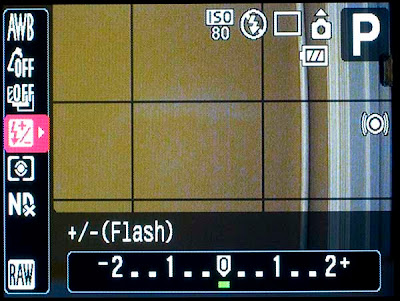
With the G9 in Program mode, turn the built-in flash on, press the Function Set button and scroll down to the flash adjustments. The G9 display should look like this:


The idea here is that you can increase or decrease the flash effect as compared to what the G9 thinks it should have been. This adjustment is independent of the shutter speed or aperture selected by Program mode.

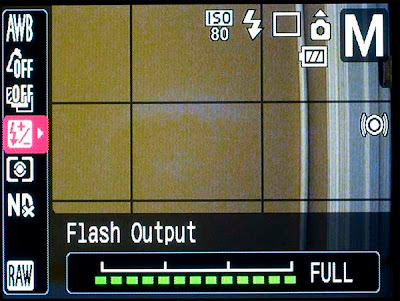
But if the G9 is in Manual exposure mode, the flash display looks like this:


In G9 Manual exposure mode, YOU control the amount of flash. It’s not difficult, take a trial shot and adjust the setting with the Control Dial. Unfortunately, the adjustments are limited to Full, 2/3 Full and 1/3 Full power.

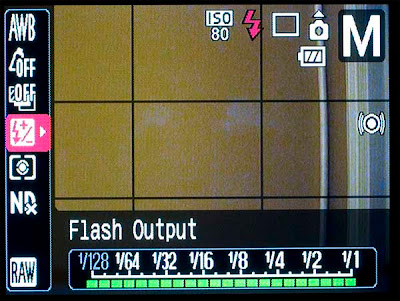
With external flash mounted on the G9, the display looks different. Here’s the display with a Canon 580EX mounted in the hotshoe; again, the G9 is in Manual exposure mode:


With the 580EX mounted and the G9 in Manual exposure, you still must manually adjust the flash; however, you can turn down the flash to 1/64 power (and to 1/128 with the 580EX II). The display is the same whether the 580EX is in ETTL or its own manual mode. It seems easier to me to leave the 580EX in ETTL and make the adjustment on the G9. A nice touch is that even older Canon flashes like the 420EX and 380EX that do not have manual adjustments on the flash can be adjusted with the G9 just like the 580EX.

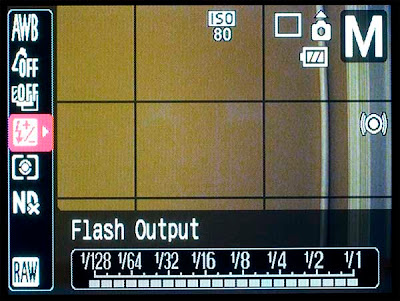
If a non-Canon flash is mounted, the G9 display looks as shown below:


The flash adjustments are grayed out and are not usable. You’ll have to adjust the non-Canon flash through its own on-flash adjustment (if any). This isn’t particularly difficult; I do it frequently with a Nikon SB-28 and SB-24.

And yes, that’s a door frame in my illustration photos! All photos of the G9 taken with the old faithful G3.

Saturday, December 15, 2007

G9 and Canon Multiple Flash

Woof-Woof is a bit of a lounge chair potato so why not practice flash photography on him? These two shots were taken at night – it’s a wonder he wasn’t asleep!


Here’s a basic bounce flash photo using the Canon 580EX on the G9. The G9 was set for ISO 80, Program mode. Exposure, selected by the G9, was 1/60 second at f3.5. (I’ve noticed that the G3, G9 and even the 20D seem to head towards max aperture in Program mode when a flash is attached.) Not too bad, although a bit flat, I’d say. Time to try a little directional lighting.

The Canon 580EX can control another compatible Canon flash – in this case, a 420EX. The 580EX was set on “master” and the 420EX on “slave”. The 580EX controls the relative amount of light that each flash emits. The 580EX ratio controls were set for 1:2 so that more light comes from the 420EX. The 420EX was placed on a bookcase and pointed directly at Woof-Woof. The 580EX was on the G9 hotshoe and pointed towards the ceiling; that is, the 580EX provided the (bounced) fill flash – similar to the first shot.


The result is a bit different from the first shot. Instead of flat, the lighting is now directional with fill. The amount of side vs bounce light can be controlled from the 580EX to suite one’s taste. The direction of the light is controlled by the position of the 420EX (slave).

Pretty simple, just don’t try it in Manual mode and expect ETTL or the ratios to work; however, the master will trigger the slave flash with the G9 in Manual mode.

(Both shots from unprocessed in-camera jpg without claiming great lighting or composition.)

Wednesday, December 12, 2007

G9 with Canon External Flash


Having a hotshoe for external flash is a great feature of the Canon G9. The G9 works well with Canon’s recent flashes and even some of the older ones. Just be aware that the G9 is small in comparison to some of these external flashes so the combination can be somewhat unwieldy. Also, the flash can cost almost as much as the G9! Here are some simplistic examples using the Canon 580EX on the G9.


Imagine that you come upon Woof-Woof in his favorite chair. Naturally, your G9 is in your hand and you quickly get the above shot using Program mode and ISO 80. The G9, being in Program mode with flash turned off, selected an exposure of 1/60 second at f3.2. As a result, the bright outdoor scene is overexposed and the indoor scene is underexposed. Flash is needed to bring up the interior lighting level. But if you use the built-in G9 flash, you can be certain of creating red-eye in poor Woof-Woof. You grab that big, expensive 580EX, fasten it to the G9 hotshoe and fire off another shoe before Woof-Woof knows what’s happening.


For this second shot, shown above, the G9, still in Program Mode but knowing that a Canon ETTL flash is in the hotshoe, again selected an exposure of 1/60 and f3.2. This is somewhat better but now it looks like a “flash” picture. Notice that the bright outdoor scene is still overexposed because the shutter speed and aperture have not changed. Determined, you remember about bounce flash, rotate the 580EX flash head towards the white ceiling and grab another shot.


Still in Program Mode, the G9 is convinced that 1/60 and f3.2 is the correct exposure; however, bouncing has softened the flash considerably as shown in the above photo. The outdoor scene is still overexposed. Suddenly you remember that a correct exposure for bright outdoors is given by the Sunny 16 rule as modified for the G9. Pretending to shoot the outdoor scene (only) through the window, sure enough: 1/500 and f5.6 is about right. You change the G9 to Manual Mode, set shutter speed to 1/500 and aperture to f5.6 and fire off a shot.


Finally, the indoor and outdoor scenes are properly exposed. Good dog, Woof-Woof!

Later you notice something odd: That last shot was not actually taken at 1/500 and f5.6 even though you know that those were the settings on the G9. That last shot was actually taken at 1/250 and f5.6. Checking the histogram, the outdoors is a little overexposed and the sky has a few blinking highlights. How could this have happened?

In Manual Mode with a Canon ETTL flash attached, the G9 will not allow shutter speeds faster than 1/250 second. If you set a faster shutter speed in Manual Mode, the speed will be reset to 1/250 when the shutter button is pressed. In fact, even if you turn the ETTL feature off, the G9 will reset from 1/500 to 1/250 shutter speed.

Even worse, ETTL was not in control of the 580EX when that last picture was taken. It was a fortunate coincidence that full 580EX power bounced from the ceiling was about right. ETTL flash control does not work when the Canon G9 is in Manual Mode. The output power of a Canon flash mounted on the G9 must be adjusted either on the G9 or on the flash when the G9 is in Manual Mode. I don’t like it but that’s the way it is -- same on all the G series cameras.

(Note: All pictures above were downsized from the unprocessed in-camera jpg for consistency. Some prefer a slightly overexposed outdoor view to preserve the effect. See the Strobist blog for many more variations on this idea.)